Why does pausing for every word stop working?
Because it turns watching into dictionary work. Stop for every unknown word and a five-minute video takes half an hour, you lose the thread of what is being said, and the part that made the video worth watching disappears. That is hard to keep up for long, and it is easy to stop watching altogether.
It is also unnecessary. You can follow a video well with some words unknown, and not every unknown word is worth your time. The skill is deciding which ones to stop for.
How many unknown words can you leave alone?
More than it feels like. Van Zeeland and Schmitt (2013) tested listening by swapping real words in spoken stories for made-up ones. Most listeners still understood the stories adequately when they knew 90% of the words, though scores among non-native listeners varied widely at that level. At 95%, the non-native listeners did relatively well and varied much less.
Video gives you extra help, because you can see what is happening. Durbahn and colleagues (2024) replaced 5%, 10% or 20% of the words in short documentaries with made-up words. Comprehension fell as the share of known words fell, with the best adequate comprehension at 95% of words known and minimal adequate comprehension at 80%.
So if you know most of the words in a video, you can leave a few unknown ones in every minute and still follow it. If you are stopping because you understand very little, the fix is an easier video, not more pausing. Our guide to comprehensible input covers how to find the right level.
Which words are worth looking up?
The ones that come back, and the ones that block the meaning. A useful test for any unknown word:
- Has it come up before? A word you have now heard twice or three times is common in what you watch, and you will meet it again. Look it up. In a study of learners watching a full-length TV programme, Peters and Webb (2018) found that words appearing more often were learned better.
- Does the sentence fall apart without it? If you can’t follow what is happening, check it. If you got the point anyway, let it go.
- Is it nearly familiar? A word you half recognise, or one close to English, is cheap to confirm and quick to keep.
- Is it a name, a one-off or a technical term? Usually skip it. You may never hear it again.
Words you skip are not lost. If a word matters, it will come back, and the second or third time is the moment to check it.
Should you guess from context instead?
Guess first, then check the words that matter. Guessing keeps you watching, and context often gets you close. It also fails quietly: you can guess wrong and never find out. In a study by Hulstijn, Hollander and Greidanus (1996), Dutch advanced students of French read a short story with translations of unknown words in the margin, with a bilingual dictionary, or with neither. Meeting a word more than once did more for learning it when readers were given its meaning than when they had nothing to go on. Without help, the authors note, readers often ignore unknown words or infer their meanings incorrectly.
The practical answer is to make checking cheap. A translation you can see without stopping, or a lookup that opens where you are already looking, lets you confirm a guess in a second and keep going. Our page on tap-to-translate goes into why the meaning in that particular sentence matters.
How do you watch a video in passes?
Watch short videos more than once, giving each pass a different job, instead of trying to catch everything the first time:
- First pass: the gist, no stopping. Watch it through once. Notice what it is about, who is talking and roughly what happens. Note any word you hear more than once.
- Second pass: read along and check. Turn on the text in the language you are learning, and check the words that passed the test above. This is where most of the video clicks. (Why that text rather than English: see target-language or English subtitles.)
- Third pass: by ear. Turn the text off and watch again. You will hear words you could not pick out the first time, which is the point.
Using each listen for a job, rather than just hearing a text again, is what made the difference in a semester-long study by Vandergrift and Tafaghodtari (2010). University students of French who were guided to predict, monitor, evaluate and solve problems as they listened did significantly better on the final comprehension test than a group that heard the same texts the same number of times without that guidance.
Short videos make this realistic. Three passes of a two-minute clip take less time than one stop-start pass of a long one, and you finish with most of it understood. If a video is too hard to follow even on the second pass, try turning the playback speed down. Our guide to why native speakers are hard to understand explains what your ear is learning on each pass.
How do you keep the words without stopping?
Save them in one step and review them later, rather than studying them in the middle of the video. Writing a word down by hand, choosing a deck and typing a definition is exactly the kind of stop that ends the habit. A single action that keeps the word, with the sentence you met it in, lets you get back to watching straight away.
Then review. Words met once in a video will fade before you meet them again. A review by Cepeda and colleagues (2006) pooled hundreds of experiments and found that spreading review out over time improved how much people retained. Our page on flashcards from videos covers the research on spacing and testing yourself.
How Bingua fits in
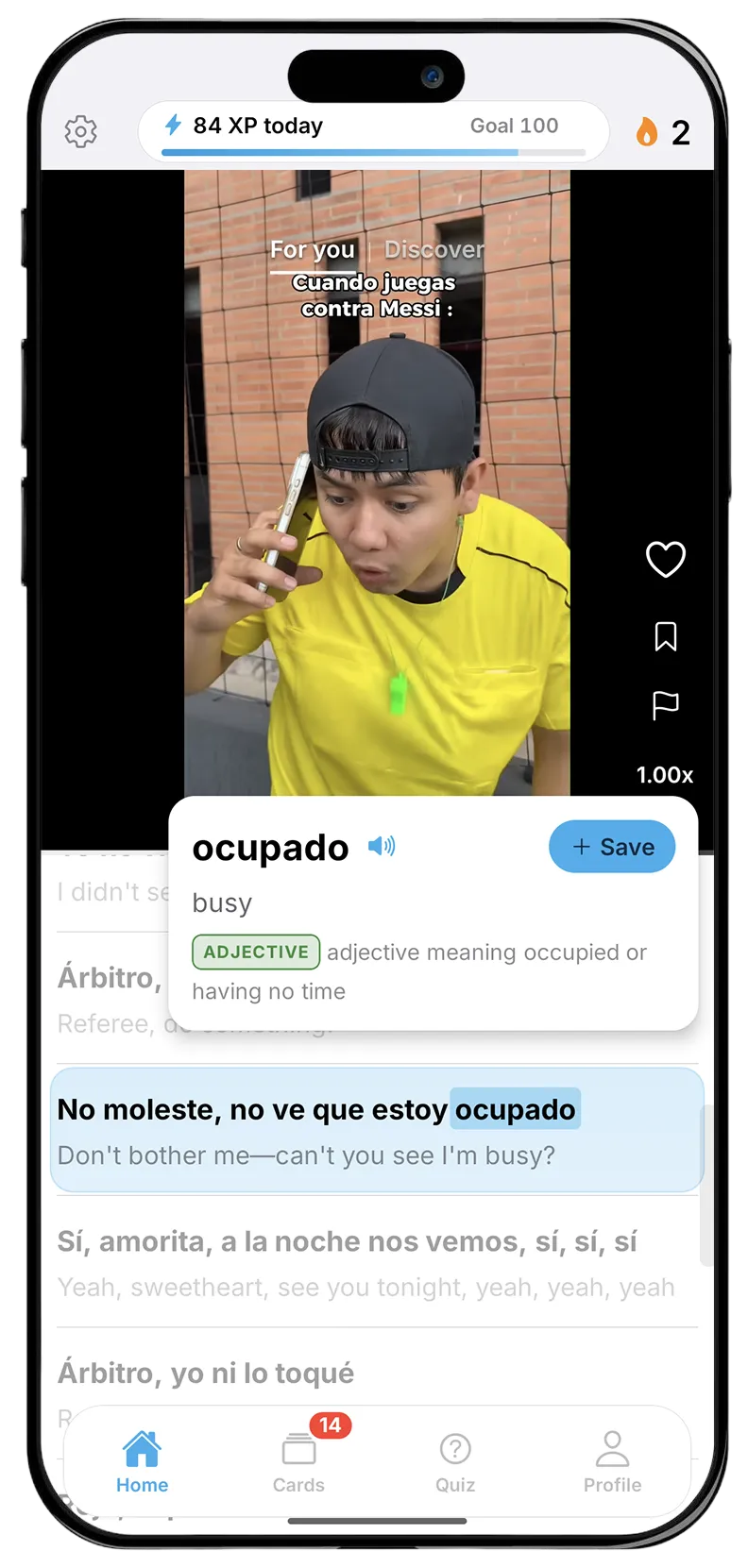
Bingua is built so that understanding a word costs one tap and no trip away from the video. It is an iPhone app with an endless feed of real videos made by native speakers, in Spanish, French, German, Dutch, Italian or Portuguese. A transcript scrolls in time with the speech, the line in the language you are learning above the English line, so you can check a sentence at a glance. Tap a word and a card opens where you were already looking, with the translation, the kind of word it is and a note on what it is doing in that sentence. Tap “+” and it is saved: no deck to choose, nothing to fill in. Saved words come back as flashcards when you are about to forget them. The feed gives beginners slower-spoken videos and advanced learners quicker ones, and speech speed can be turned down in settings.