How do you turn words from a video into flashcards?
Catch the word, find what it means in that sentence, make a card, and review it on a schedule. This works with any video and any flashcard tool:
- Catch the word. Pause and write down the word along with the whole sentence it appeared in. The sentence is what reminds you later how the word was used.
- Find the meaning in that sentence. Many words have several meanings, so look for the one that fits the line you heard, not just the first dictionary entry.
- Make the card. Put the word on the front, and the meaning and the sentence on the back. Keep to one word per card.
- Review it when it is due. Spaced repetition software works out when each card should come back, so you are not left guessing what to practise.
The hard part is the switching. Each word takes you out of the video and into a dictionary and a flashcard app, and that break is what wears the habit down. If you are making cards by hand, our guide to watching without pausing every word shows how to keep the stops to a few.
How does Bingua turn videos into flashcards?
Bingua does those steps inside the video you are already watching, so saving a word takes two taps. Every card in your deck comes from a video you chose to watch.
- Watch. The transcript scrolls in time with the speech, with the line in the language you are learning above the English line.
- Tap a word you don’t know. A card opens where you were already looking, with the translation, the part of speech and a plain-English note on what the word is doing in that sentence. This is tap-to-translate.
- Tap + Save. That is the whole action. There is no deck to choose, no form to fill in, and no decision about whether a word is important enough.
- Swipe a line that tangles you up. Swipe it sideways for a short breakdown of how the sentence fits together, and save that too.
- Review. Later, the Cards tab shows a number: the words and sentences waiting for you. You see a card, grade how well you knew it, and the deck decides when to show it to you next.
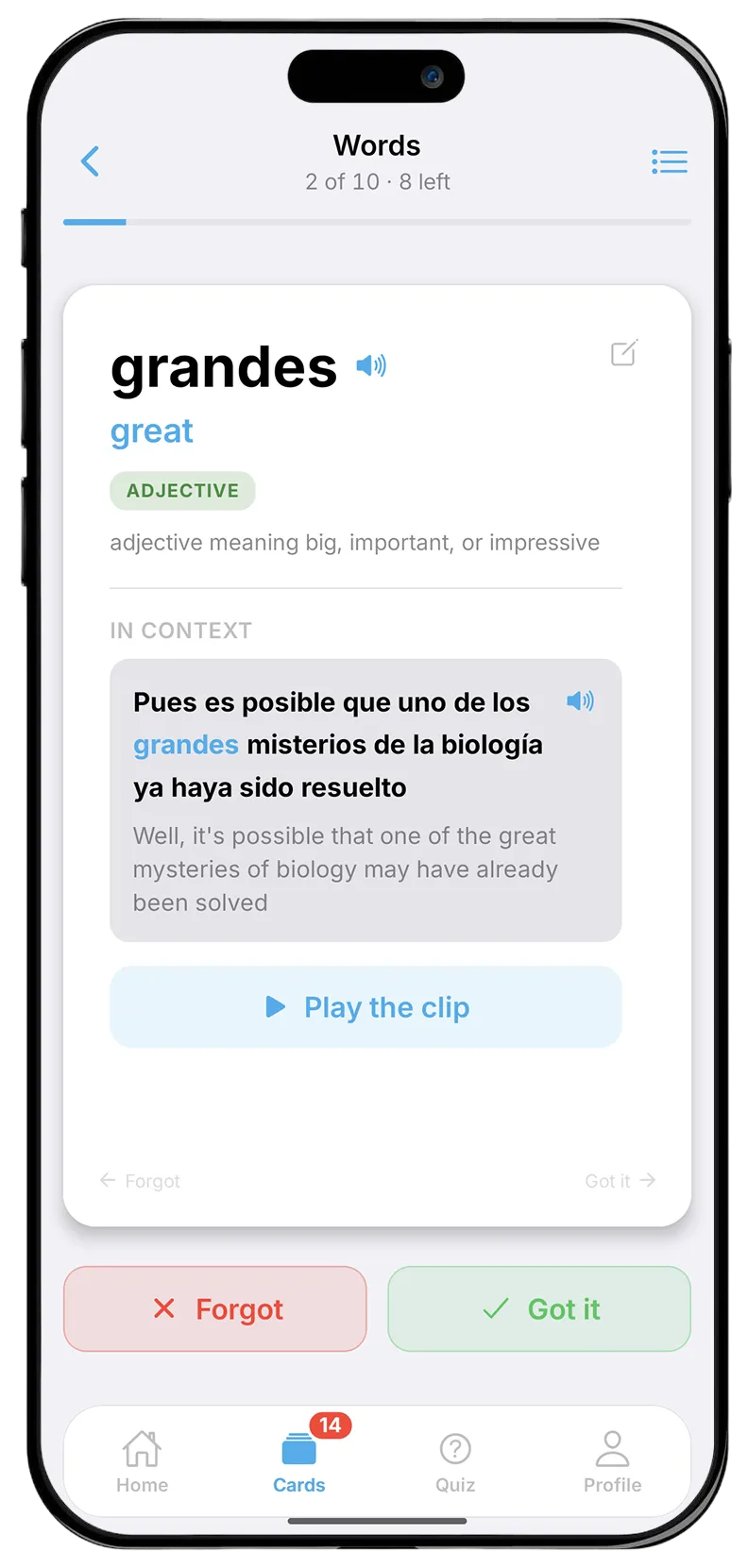
Studying becomes a side effect of watching. The deck fills up while you watch things you wanted to watch anyway, and nothing in it was assigned to you. It works in all six languages, with English always on the translation side.
Should you save a word or a whole sentence?
Save a word when one word is what stopped you, and a sentence when you knew the words but still couldn’t see how the line fits together. A word card keeps that one word. A sentence breakdown keeps the explanation of how that line works, the thing a tutor would lean over and tell you. In Bingua you can save both, so you never have to pick one kind of saving for good.
Which words from a video are worth saving?
Save the words that stopped you and that you can imagine wanting again. Names, one-offs and technical terms can usually go. Our guide has a short test for which words are worth looking up, and the same test works for saving.
How strict to be depends on what a card costs you. When you make each card by hand, it pays to be choosy. In Bingua saving is one tap and flashcards are unlimited on both plans, so you can save a word and get back to the video without weighing it up.
When do your saved words come back?
They come back when they are due, which is when you are about to forget them. You don’t plan any of this. The Cards tab shows a number when cards are waiting, you grade each one, and the deck decides when you will see it next. The deck fills up and comes back to you without a study session ever being scheduled.
What is in the Bingua quiz?
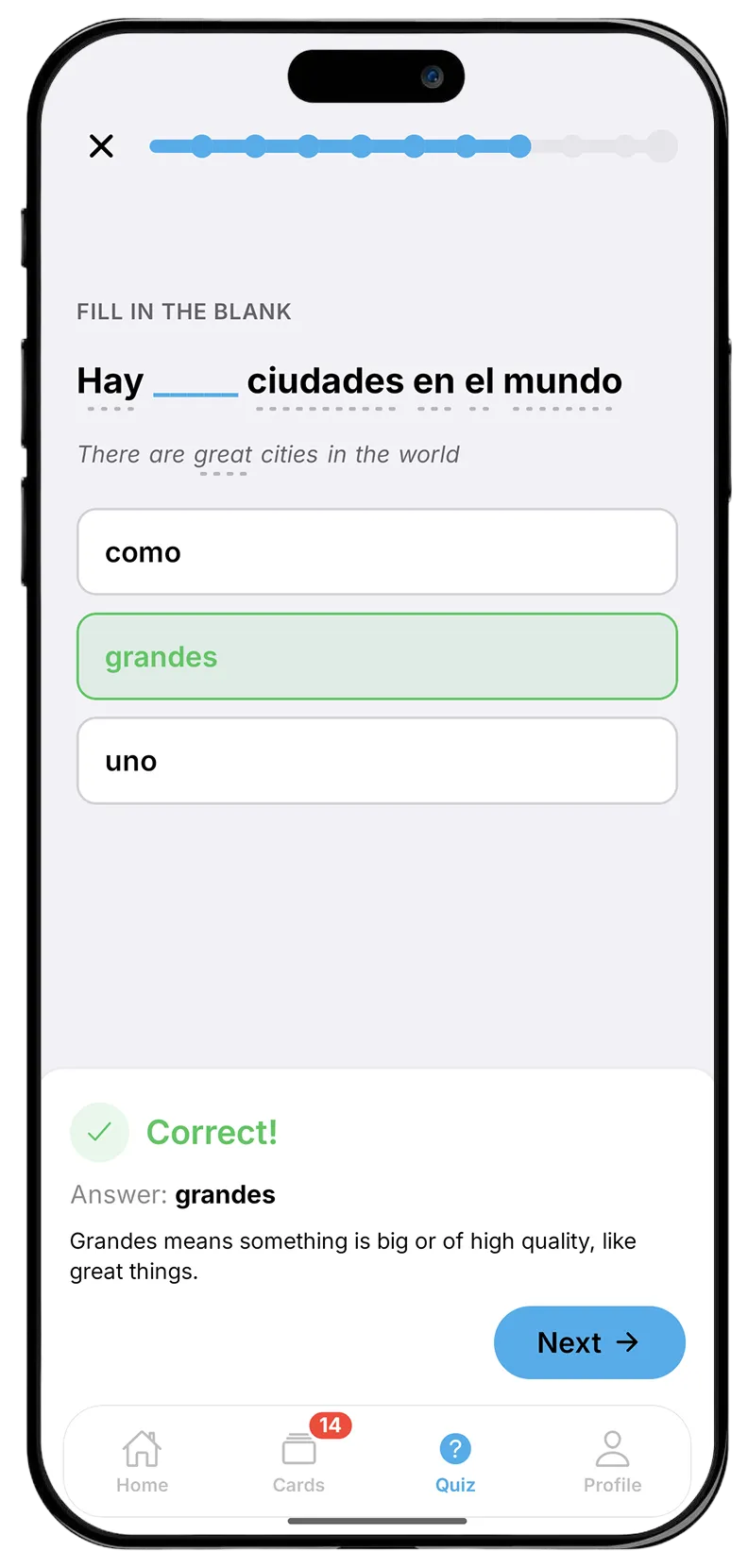
Ten questions built entirely from your own saved words: listening, typing, matching, and saying words out loud into the microphone. Nothing in it comes from a set word list. Every question uses a word you saved from a video, and answering it means recalling that word rather than rereading it, which matters for the reasons below.
Why do words you understood today disappear by next week?
Because understanding a word in the moment and remembering it later are different things. While you watch, the video, the subtitles and the context all help you understand. A week later, none of that is there, and a word you met once has usually gone.
Watching more helps, since words you meet again get reinforced. But the words you most want to keep are often not the ones that happen to come up again soon. Saving them and reviewing them on purpose is how you stop leaving that to chance.
What does memory research say about reviewing?
Two findings matter most.
Spacing beats cramming. A review by Cepeda and colleagues (2006) pooled 839 assessments of spaced practice from 317 experiments. Spreading study out over time improved how much people retained, and the best gap between reviews depended on how long the material needed to be remembered: the longer you want to keep something, the longer the ideal gap. Spaced repetition software applies this automatically, scheduling each item for review at a growing interval.
Recalling beats rereading. In a study published in Science, Karpicke and Roediger (2008) had students learn foreign-language vocabulary. Once a student could produce a word correctly, studying it again did nothing for later recall, while testing it again had a large positive effect. The students’ own predictions of how well they would do were unrelated to how well they actually did, which is a good reason to trust a review schedule over your own sense of what you know.
A flashcard that asks you to recall a word, shown again when it is due, puts both findings to work.
How do you get the most out of flashcards?
These habits help with any flashcard system:
- Review little and often. A few minutes on most days does more than a long session once a week, because it keeps the gaps working for you.
- Try to recall before you look. The effort of remembering is what does the work. Peeking first turns a test back into rereading.
- Grade honestly. Saying you knew a word you half-knew pushes its next review too far away.
- Keep the sentence with the word. The line you heard a word in shows what it meant there and how it was used.
- Save words you would actually use. A deck full of words you will never need is harder to keep up with, and easier to give up on.