Which subtitles should you use?
It depends on what you want from the video and how much of it you can follow. Researchers use two words here, and the difference matters: captions are on-screen text in the language being spoken, and subtitles are a translation into your own language (English, for most readers of this page). The studies on both point to a fairly simple rule:
| If you want to | Use |
|---|---|
| Follow the story of something well above your level | English subtitles |
| Learn new words and what they look like | Captions in the language you are learning |
| Train your ear for real speech and accents | Captions in the language you are learning |
| Find out what you can now follow by ear | No text, on a later viewing |
The rest of this page is the evidence behind each row, and where it runs out.
What do captions in the language you are learning do?
They help with both listening and learning words, and they have the strongest evidence of any option. In a 2022 review in Language Teaching, Maribel Montero Perez of Ghent University surveyed the research on learning languages from video. A meta-analysis she describes, pooling earlier studies, found a large effect of captions on comprehension compared with watching without on-screen text, and a large effect on vocabulary “irrespective of the type of vocabulary test used and the proficiency level of the learners.” Her summary for teachers: the “most robust results have been found for captioned video.”
Part of the reason is that captions show you where one word ends and the next begins, which is exactly what is hard to hear in natural speech. They also put the written form of a new word in front of you while you hear it. In two studies with learners of English in Flanders, one at a general school and one at a vocational school, Peters, Heynen and Puimège (2016) found that captions “have the potential to increase form learning,” meaning learning what a new word looks and sounds like. Learners who watched with subtitles in their own language did no better than the captions group on tests of what the words meant. The authors are candid that learning gains were low overall, and that learners with bigger vocabularies, and words that came up more often in the video, did better.
Do captions help you understand accents and real speech?
Yes, in the clearest experiment on the question. Mitterer and McQueen (2009) had Dutch university students with good English watch 25 minutes of a Scottish or Australian English video with English subtitles, Dutch subtitles or none, and then repeat back audio clips in that accent. On clips they had not heard before, the group that watched with English subtitles did better than the group with no subtitles, and the group with Dutch subtitles did worse than both. Dutch subtitles helped only with lines the students had already heard in the video.
The authors’ explanation is that text in the language being spoken shows “which words (and hence sounds) are being spoken,” so your ear can learn how that speaker pronounces them. A translation can’t do that, and “native-language subtitles appear to create lexical interference.” Their advice was concrete: an American speaker of Mexican Spanish who wants to understand European Spanish should watch European Spanish films with Spanish subtitles.
It is one experiment, with a repetition task rather than a comprehension test, so treat it as a strong pointer rather than the last word. The 2022 review calls the evidence on captions and speech perception “first indications,” and it describes a later study that found the same split: perception of speech developed better with captions, while scores on a test of the plot were highest with subtitles.
When are English subtitles the better choice?
When the video is well above your level and following it is the goal. In an eight-month study by Pujadas and Muñoz (2020), four classes of secondary school students learning English watched 24 episodes of a TV series, two classes with captions and two with subtitles in their own language. The authors report “a significant advantage of subtitles over captions for content comprehension.” How much vocabulary a student already knew predicted comprehension, particularly in the captions group: with captions, what you can follow depends on the words you know.
Montero Perez’s review reaches the same place from a wider set of studies. In one she describes, beginners benefited most from subtitles, intermediate learners showed no difference between kinds of on-screen text, and advanced learners did best with no text at all. Her conclusion is that subtitles “seem to be especially relevant for making L2 audio-visual input available to beginning L2 learners.”
The catch is that following the story and learning the language are not the same thing. Eye-tracking studies, summarised by Peters and colleagues (2016), show that people read subtitles largely automatically when they are on screen, so with a translation available, your eyes spend their time on English. That is fine for enjoying a film, and less useful for training your ear.
What about showing both languages at once?
The research is still catching up. The 2022 review says the question of whether bilingual subtitles beat other kinds of on-screen text for comprehension “remains largely unanswered”: several studies it describes found no difference between captions, subtitles and both together, and one eye-tracking study found that viewers tended to pick one of the two languages as their main source.
For learning words, there is more to go on. In an eye-tracking study by Wang and Pellicer-Sánchez (2022), learners who watched with both lines did better than the captions group at recognising what new words meant, while captions alone did better for recognising how those words are written. What predicted learning was how long viewers looked at the word in the language being learned, not at its translation. Our page on dual-language subtitles covers that study in more detail.
The practical reading: two lines can give you the best of both, as long as you read the line you are learning first and use the translation to check.
Should you ever turn the text off?
Yes, once a video mostly makes sense with captions. Real conversations come without text, and listening with nothing to read is how you find out what you can now follow by ear. A simple way to do this is to watch a short video more than once: first for the gist, then reading along, then with the text off. Our guide to learning from native video without pausing every word sets out that routine.
How do you choose, video by video?
Match the text to the video in front of you, not to a fixed rule about your level:
- If you can’t follow the story even with captions, switch to English subtitles, or better, choose an easier video. Understanding most of what you hear matters more than which text is on screen. Our guide to comprehensible input covers how to find the right level.
- If you can mostly keep up with captions, use them. This is where the research is strongest, for vocabulary and for your ear.
- If you show both lines, read the original first and glance at the English only to check.
- If a video already makes sense, watch it again without text.
The same person can need all four in one evening: a slow interview on a familiar subject may work with captions, while a group of friends talking over each other may need the translation for now. Our guide to why native speakers are hard to understand explains what makes that difference.
How Bingua fits in
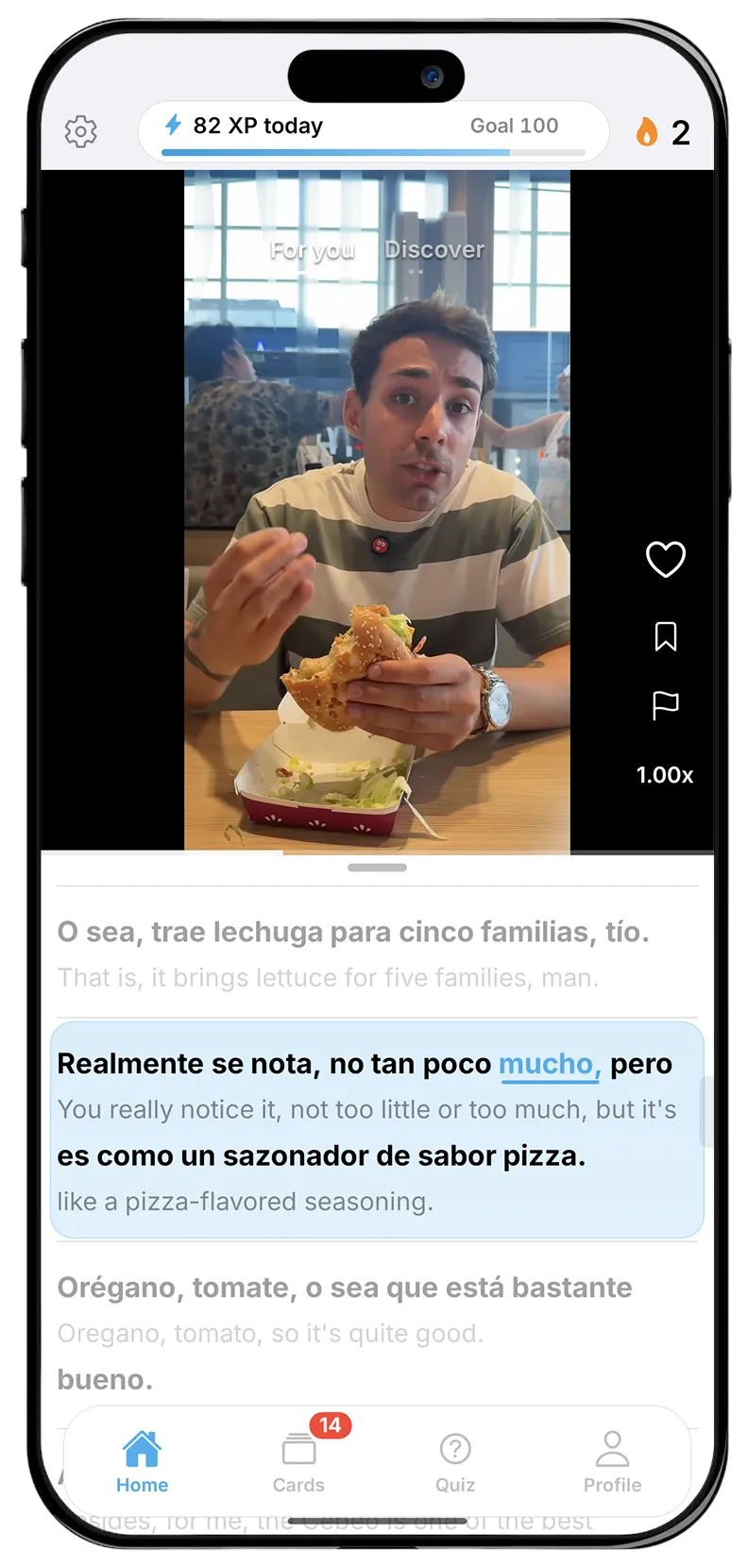
Bingua shows both lines at once. It is an iPhone app with an endless feed of real videos made by native speakers, in Spanish, French, German, Dutch, Italian or Portuguese, and every video comes with a transcript that scrolls in time with the speech: the line in the language you are learning on top, and the English line beneath it. The original comes first, and the translation is one glance below when you need to check. Tap a word and a card opens with its translation, the kind of word it is and a note on what it is doing in that sentence; swipe a line sideways for a short breakdown of how it fits together. The feed gives beginners slower-spoken videos and more advanced learners quicker ones, and speech speed can be turned down in settings.